
Want a website?
Do it yourself with our
WYSIWYG Website Software!
Do it yourself with our
WYSIWYG Website Software!


Website Builder Software
..............................................
..............................................
..............................................
..............................................
► Software
Copyright 2006 awardconnections.org - All Rights Reserved
▲ Return
Easy Blogs is an easy-to-use tool to create web sites for blogs, journals, and much more.
------------------------------------------------------------------
Choose the look and feel of your web site with one of the many included templates or create your own.
Now anyone can write and publish his or her very own web log or "blog". Simple enough for the non-technical, and yet with enough extra features to please the demanding too.
Create your Blog on your PC. Publish anywhere!
------------------------------------------------------------------
Choose the look and feel of your web site with one of the many included templates or create your own.
Now anyone can write and publish his or her very own web log or "blog". Simple enough for the non-technical, and yet with enough extra features to please the demanding too.
Create your Blog on your PC. Publish anywhere!
Easy Blogs
Product Details
Easy to use features include:
- Specify a "cool link" to be included in any entry. Great if you are writing about a news link or
about some web site that caught your eye.
- Include pictures with any entry. Support includes GIF, PNG, and JPEG image files.
- Include your most recent entries on either the home page or on a separate recent entries page.
- Create archives by month, week, or day with helpful indexes.
- Your web site is created using templates. You do not need to do any programming. Just pick
one and click on generate. If you are in the mood for something completely different, just pick a
new template, click, and the entire site changes.
- Automatic publishing to your web site using either FTP or to a local directory on your computer.
- Your journal information is kept on your local computer, so you can move your site to another
web site host just by changing your publishing location and clicking.
Advanced features include:
- Automatically generate an RSS 2.0 feed of your current entries.
- Quick buttons for inserting HTML code
- Optionally turn any entry into its own web page. Great for publishing articles.
- Optional categories for all entries and articles, and the automatic creation of category index
pages.
- Option to specify a prefix for all page names. Useful when publishing multiple blogs to the same
location.
- And so much more...
-----------------------------------------------------------------------
You can keep up any number of journals at the same time so you and your family can share one copy of Easy Blogs.
Easy Blogs includes a wide variety of templates in the licensed edition. You can download additional free templates from Easy Blogs Template Collection at any time.
Easy Blogs - Free your thoughts!
Easy to use features include:
- Specify a "cool link" to be included in any entry. Great if you are writing about a news link or
about some web site that caught your eye.
- Include pictures with any entry. Support includes GIF, PNG, and JPEG image files.
- Include your most recent entries on either the home page or on a separate recent entries page.
- Create archives by month, week, or day with helpful indexes.
- Your web site is created using templates. You do not need to do any programming. Just pick
one and click on generate. If you are in the mood for something completely different, just pick a
new template, click, and the entire site changes.
- Automatic publishing to your web site using either FTP or to a local directory on your computer.
- Your journal information is kept on your local computer, so you can move your site to another
web site host just by changing your publishing location and clicking.
Advanced features include:
- Automatically generate an RSS 2.0 feed of your current entries.
- Quick buttons for inserting HTML code
- Optionally turn any entry into its own web page. Great for publishing articles.
- Optional categories for all entries and articles, and the automatic creation of category index
pages.
- Option to specify a prefix for all page names. Useful when publishing multiple blogs to the same
location.
- And so much more...
-----------------------------------------------------------------------
You can keep up any number of journals at the same time so you and your family can share one copy of Easy Blogs.
Easy Blogs includes a wide variety of templates in the licensed edition. You can download additional free templates from Easy Blogs Template Collection at any time.
Easy Blogs - Free your thoughts!
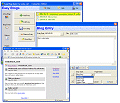
1. The Opening Page
This is what you will see first when you start up Easy Blogs. Most of the time, you would open a Blog, and start entering your thoughts. Other choices include utility features such as backing up your blog files, and the template editor -- so you can change existing templates or create new ones.
2. List of Entries
Once you open a blog, you see a list of all your entries so far - in descending date order. Just click on Add Entry to start your next entry
3. Blog Entry
Adding an entry is simple. Enter a title and some entry text, everything else is optional. Date and time automatically default to current but can be easily changed. Inserting picture and links to files are just a click away too and the toolbar allows you to insert extra HTML code as you like.
4. Blog Pictures
Adding pictures is easy too. All new pictures are automatically uploaded when you publish your blog.
This is what you will see first when you start up Easy Blogs. Most of the time, you would open a Blog, and start entering your thoughts. Other choices include utility features such as backing up your blog files, and the template editor -- so you can change existing templates or create new ones.
2. List of Entries
Once you open a blog, you see a list of all your entries so far - in descending date order. Just click on Add Entry to start your next entry
3. Blog Entry
Adding an entry is simple. Enter a title and some entry text, everything else is optional. Date and time automatically default to current but can be easily changed. Inserting picture and links to files are just a click away too and the toolbar allows you to insert extra HTML code as you like.
4. Blog Pictures
Adding pictures is easy too. All new pictures are automatically uploaded when you publish your blog.

$45.00 USD
..............................................